📝Daily
Day 75

Tony Duong
Nov 11, 2026 ・ 9 min
#engineering#blockchain#ethereum#solidity#zx#javascript#presentation
Today, I:
- came across an old presentation I gave at MonstarLab (Backend Knowledge Sharing, July 2022) about
zxand Blockchain 101: building a 90年代メルカリ DApp ⛓ (full content copied below)
Backend Knowledge Sharing 📚
今日のスケジュル (Today’s schedule)
- Self-introduction 🙎🏻♂️
zx- a tool for writing better shell scripts 🛠- Blockchain 101 ⛓ How to develop a 90年代メルカリー DApp ☎️
Notes
📌 Reminders
- I know everyone is busy so just relax and listen like if you were listening at a radio talk 🎧
- We’ll do Q&A at the end
- Please add your questions or comments in the Google Meets chat 🙋🏻♀️
Self-introduction
👋 Hi! My name is Tony Duong 🙋🏻♂️
const name = "Tony Duong" // My parents are from Vietnam 🇻🇳
const country = "🇫🇷" // Born in Toulouse 💕
let age = 28
const cameToJapanIn = new Date("2018/02") // Just after graduation
let careers = [
"2018 ~ 2019 - Seido 株式会社 (Intern → 正社員) - Full-stack Web Developer", // e-commerce (seidoshop.com)
"2019 ~ 2022 - Overflow 株式会社 (正社員) - Full-stack Web Developer" // job matching platform (offers.jp)
"2022 - MonstarLab - Backend Engineer"
]
let technologies = ["Ruby", "Ruby on Rails", "VueJS", "AWS"]
let sports = ["⚽️", "🧗♀️", "🏃🏻♀️"] // @Sivan, I still owe you a nutmeg 😡
zx - a tool for writing better shell scripts 🛠
What is zx? 🤔
- Tool for writing shell scripts in Javascript
- Was the most popular JS projects overall in 2021 according to Rising Stars 🎉
Is zx that good?
- Shell scripts are often used for automating repetitive tasks (CI/CD, data backup, application startup…)
- Shell scripting language is considered is commonly considered difficult to write ✍🏻 and to read 👀
- Syntax is unintuitive (everytime I must search how to write basic loops 😩)
- No exception handling
- JSON and array manipulation is quite complex
- In order to solve the problems above,
zxhas been developed 👍 Shell scripting is now becoming easier by using Javascript (or Typescript), a very common and easy language 🥳
So if you can master zx , then you can say goodbye to Shell Script 👋
How does it work?
- Installation is as simple as
npm install -g zx
zxshell scripts extension is.mjs- To execute a script, just call
zx file.mjs
Let me show you some examples 👀
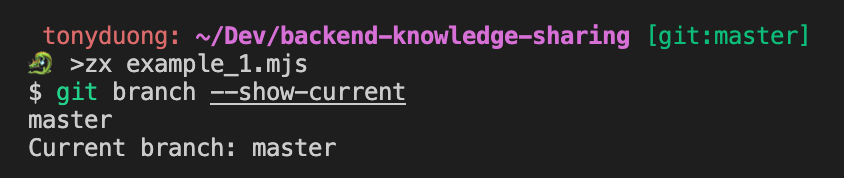
Example 1 - Show current branch name
- Script 📋
#!/usr/bin/env zx
const branch = await $`git branch --show-current`
console.log(`Current branch: ${branch}`)
- Output ✅
Example 2 - Add colors & formatting
- Script 📋
#!/usr/bin/env zx
$.verbose = false
let branch = await $`git branch --show-current`
console.log(`Current branch: ${chalk.bgYellow.red.bold(branch)}`)
- Output ✅

Example 3 - Add user inputs
- Script 📋
#!/usr/bin/env zx
$.verbose = false
let filename = await question('What is the filename? ')
let template = await question('What is your preferred template? ', {
  choices: ["function", "class"] // Enables tab completion.
})
let content = ""

if(template == "function") {
    content = `function main() {
    console.log("Test");
}`;
}
else if(template == "class") {
    content = `class Main {
    constructor() {
        console.log("Test");
    }
}`;
}
else {
    console.error(`Invalid template: ${template}`)
    process.exit();
}
fs.outputFileSync(filename, content)
- Output ✅ — 🎬 watch the demo video
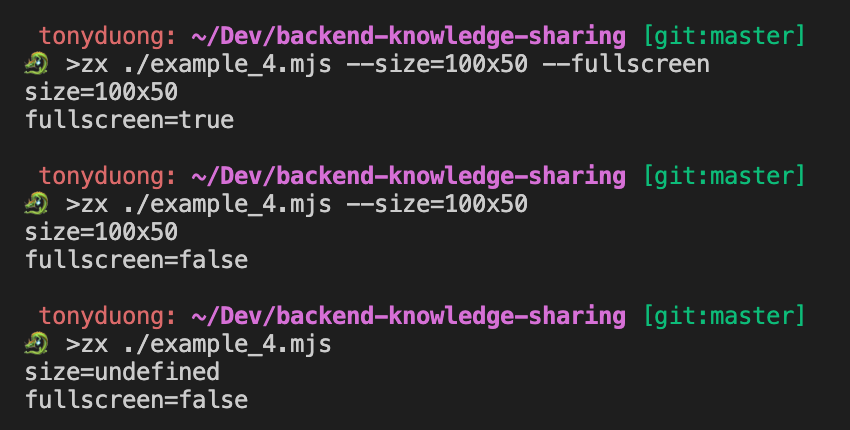
Example 4 - Handling command-line arguments
- Script 📋
#!/usr/bin/env zx
$.verbose = false
const size = argv.size;
const isFullScreen = argv.fullscreen;
console.log(`size=${size}`);
console.log(`fullscreen=${isFullScreen}`);
zx ./script.mjs --size=100x50 --fullscreen
- Output ✅
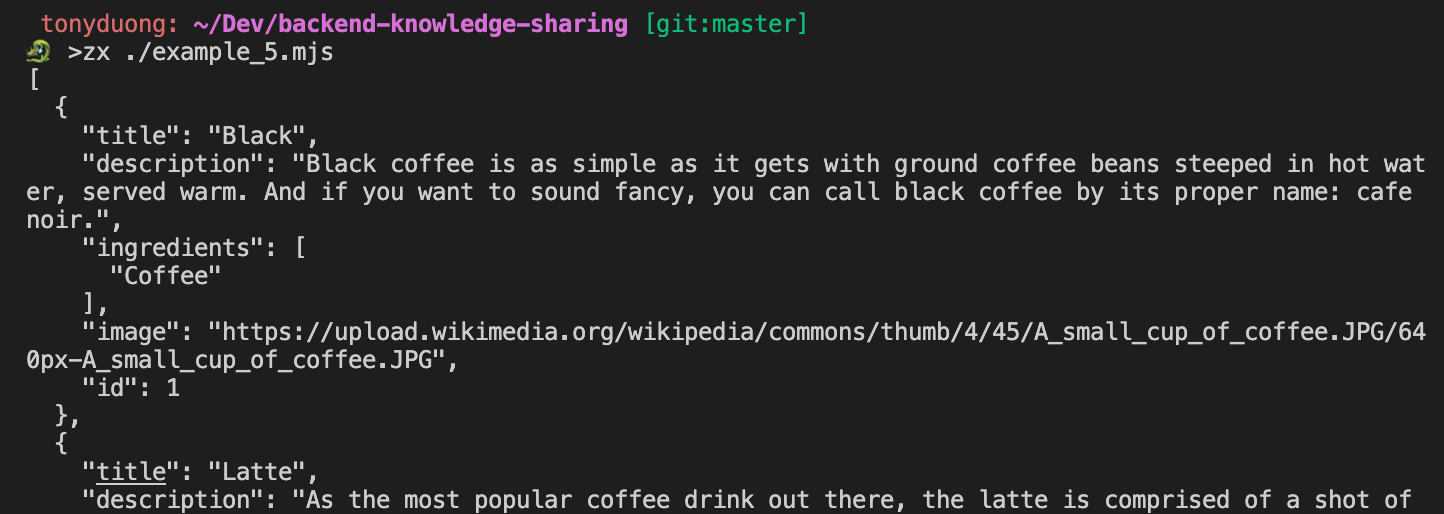
Example 5 - Network requests
-
In bash, we often use the
curlcommand to make HTTP requests in Bash scripts.zxではnode-fetchmodule を裏で wrap してくれてfetchでできます! -
Script 📋
#!/usr/bin/env zx
$.verbose = false
let response = await fetch('https://api.sampleapis.com/coffee/hot');
if(response.ok) {
  console.log(await response.text());
}
- Output ✅
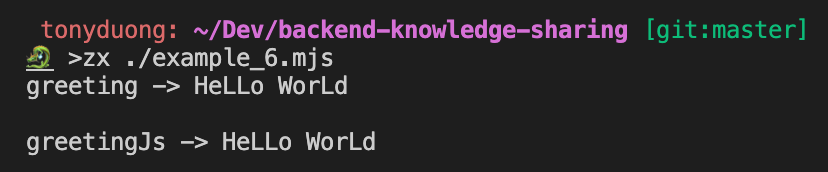
Example 6 - Constructing command pipelines
- Script 📋
#!/usr/bin/env zx
$.verbose = false
// A pipeline using |
let greeting = await $`echo "Hello World" | tr '[l]' [L]`

console.log(`${greeting}`)
#!/usr/bin/env zx
$.verbose = false;
// The same pipeline but with the .pipe() method
const greeting = await $`echo "Hello World"`.pipe($`tr '[l]' [L]`);

console.log(`greeting -> ${greeting}`);

// Using full JS
const greetingJs = "Hello World".replaceAll("l", "L");

console.log(`greetingJs -> ${greetingJs}`);
- Output ✅
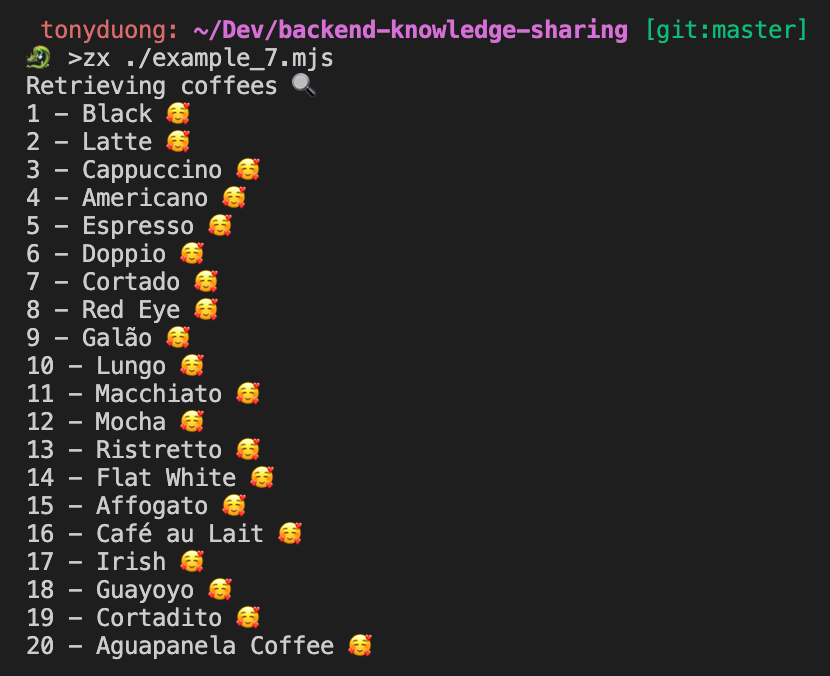
Example 7 - Handling JSON format
- Script 📋
#!/usr/bin/env zx
$.verbose = false;

console.log("Retrieving coffees 🔍");
const response = await fetch("https://api.sampleapis.com/coffee/hot");
const coffees = JSON.parse(await response.text());

for (let i = 0; i < coffees.length; i++) {
  const coffee = coffees[i];
  console.log(`${coffee.id} - ${coffee.title} 🥰`);
}
- Output ✅
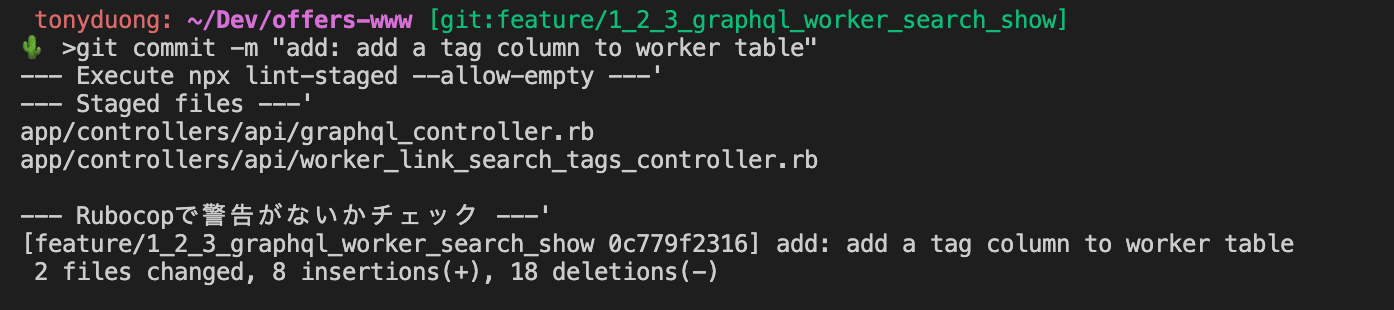
Example 8 - pre-commit
- Script 📋
#!/usr/bin/env -S npx zx
$.verbose = false;

console.log(`--- Execute npx lint-staged --allow-empty ---'`);
await $`npx lint-staged --allow-empty`;

console.log(`--- Staged files ---'`);
let stagedFiles;
try {
  stagedFiles =
    await $`git diff --cached --name-only --diff-filter=AM | grep '\.rb$'`;
} catch {
  console.log("No .rb file staged. Execute commit.");
}

if (stagedFiles) {
  console.log(`--- Rubocopで警告がないかチェック ---'`);
  await $`git diff --cached --name-only --diff-filter=AM | grep '\.rb$' | xargs docker-compose run --rm offers-app rubocop --color --auto-correct --force-exclusion {staged_files}`;
}
- Output ✅
Conclusion
zxreally makes shell scripting easier to write and read by using Javascript syntax ⚡️- Let’s master
zxand finally say goodbye to complex shell scripting 👋
References
- https://github.com/google/zx
- https://zenn.dev/offers/articles/20220606-zx-introduction
- https://blog.mastykarz.nl/create-scripts-javascript-zx/
- https://www.sitepoint.com/google-zx-write-node-shell-scripts/
Blockchain 101 ⛓ How to develop a 90年代メルカリー DApp ☎️
What is the Blockchain? 🤔
- According to investopedia.com,
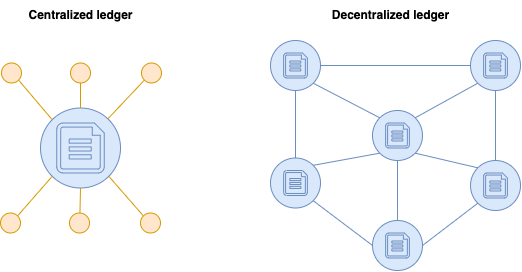
A blockchain is a distributed database or ledger that is shared among the nodes of a computer network.
World without Blockchain 💾
- Let’s take the example of banks 🏦
- Each bank manages a ledger (a kind of database that records all monetary transactions) and they have full control over it ⇒ they have a lot of power and responsibility 💥
- What if someone corrupts a bank ledger 😱 What if a bank starts to bend the rules and manages to create value out of thin air by manipulating the ledger 😱
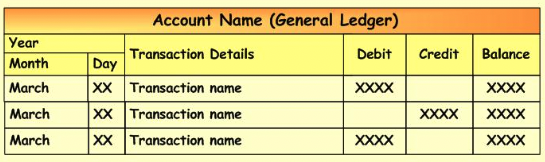
- In a blockchain-free world, you need to trust a third-party to take care of recording all the transactions
The introduction of Bitcoin in 2008 💡
- Bitcoin came around in 2008 with a white-paper published by Satoshi Nakamoto 🇯🇵 in order to introduce a new kind of monetary system and a decentralized way to create, transfer and store value in a completely digital form
- Bitcoin is one implementation of the blockchain but there are others like Ethereum.
Design goals of the Blockchain 👩🎨
- Peer-to-peer data distribution (Peer-to-peer データ配布)
Data is distributed across the nodes in the network.
Tasks and workload are distributed and all nodes are equally priviledged.
Each node contains a full copy of the blockchain state.
- Decentralization (分散化)
No master data, thus avoiding a single point of failure. Corruption then becomes much more difficult.
To make data consistent across all the network, an algorithm called "consensus algorithm" is adopted.
- Immutability (不変性)
You can not change history and can only append operations. Even delete operations are considered as transactions.
- Trustless (トラストレス)
You don't have to trust a third party: bank, person, etc.
Rather, you trust everyone in the blockchain.
Implementations of the Blockchain 🧑💻
- Bitcoin was the first implementation
- Bitcoin purpose is to replace national currencies
- Nothing more than a medium of exchange and store of monetary value 💵
- But then, why don’t we apply the same principles in a more generic way? 🎟 📜 🎶
- Instead of certifying that I am the real owner of some Bitcoin, we could also implement a similar technology for certifying that I am the real owner of some piece of art, some concert tickets, some AWS certifications
- Vitalik Buterin got this idea and implemented another version of the Blockchain: Ethereum 🥳
Ethereum & Smart Contracts
- Currency is ETH (Ether)
- Smart contracts are the building blocks of the Ethereum network
- They are computed programs coded by developers that are run in the Ethereum network
- Once deployed, they cannot be changed. Remember, the blockchain is immutable
- A smart contract has a state (data) and functions
- A smart contract has an address on the Ethereum blockchain like any other Ethereum user account
- Simple explanation 🐥
- A smart contract is like a vending machine 🤖
- It has some state (🍫 🥤 🍙)  and some functions (view products / buy product / recharge product)
- Once you installed it somewhere, you cannot move it or change its functioning FOREVER
- It has an address (location in the real world) and like any other person wallet, it has some money in it
- All transactions that are modifying a state in the blockchain are subject to fees 💰 (when deploying a smart contract, buying a product, charging a vending machine…)
Let’s now implement a smart contract and build a decentralized application - 90年代メルカリ ☎️
Technologies & Tools 🛠
- Ethereum network
- Solidity programming language for implementing Smart Contracts on Ethereum
- web3.js library for interacting with the Ethereum network from our browser 🖥
- Metamask Chrome extension 🦊 which is a wallet used to interact with the Ethereum blockchain
- Ganache for deploying an Ethereum blockchain locally (simulator)
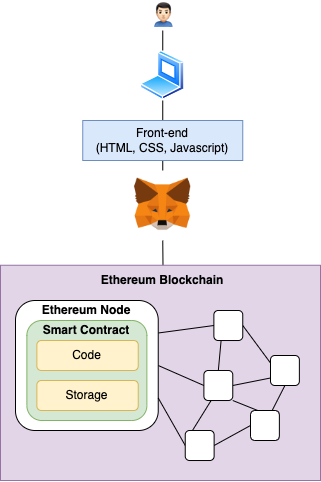
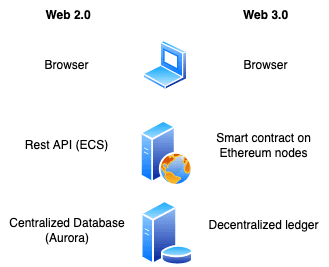
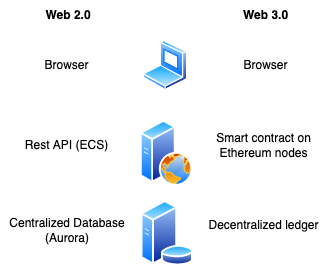
Architecture 📊
Comparison between a classic Web 2.0 and Web 3.0 architecture
Let’s check the code 👨🏻💻
https://github.com/tonystrawberry/mercari90-dapp
Demo time ⏰
- Smart contract の migration
- Metamask で accounts の セットアップ
- 開発環境の立ち上げ
- Selling a product
- Ganache で transaction の確認
- Buying a product
- Ganache で transaction の確認
References 📚
- https://www.udemy.com/course/getting-started-with-ethereum-solidity-development/
- https://arunrajeevan.medium.com/blockchain-design-goals-3be234ccfaf3
- https://docs.soliditylang.org/en/v0.8.15/
皆さんありがとうございました!🙇🏻♂️
- 質問があれば、気楽聞いてください
- このプレゼンテーションは Confluence の TechTalks の下にみれます:https://monstarlab-jp.atlassian.net/wiki/spaces/CD/pages/447087534/Tech+Talk+-+20220728