📝日常
75日目

Tony Duong
11月 11, 2026 ・ 6 分
#engineering#blockchain#ethereum#solidity#zx#javascript#presentation
今日やったこと:
- MonstarLab(Backend Knowledge Sharing、2022年7月)で発表した
zxと Blockchain 101: 90年代メルカリ DApp の作り方 ⛓ についての昔のプレゼンを見つけた(以下に全文をコピー)
Backend Knowledge Sharing 📚
今日のスケジュル (今日の予定)
- 自己紹介 🙎🏻♂️
zx- より良いシェルスクリプトを書くためのツール 🛠- Blockchain 101 ⛓ 90年代メルカリー DApp の作り方 ☎️
メモ
📌 お知らせ
- みなさん忙しいと思うので、ラジオを聴いているような感じでリラックスして聴いてください 🎧
- 最後にQ&Aをやります
- 質問やコメントは Google Meet のチャットに書いてください 🙋🏻♀️
自己紹介
👋 こんにちは!Tony Duong です 🙋🏻♂️
const name = "Tony Duong" // My parents are from Vietnam 🇻🇳
const country = "🇫🇷" // Born in Toulouse 💕
let age = 28
const cameToJapanIn = new Date("2018/02") // Just after graduation
let careers = [
"2018 ~ 2019 - Seido 株式会社 (Intern → 正社員) - Full-stack Web Developer", // e-commerce (seidoshop.com)
"2019 ~ 2022 - Overflow 株式会社 (正社員) - Full-stack Web Developer" // job matching platform (offers.jp)
"2022 - MonstarLab - Backend Engineer"
]
let technologies = ["Ruby", "Ruby on Rails", "VueJS", "AWS"]
let sports = ["⚽️", "🧗♀️", "🏃🏻♀️"] // @Sivan, I still owe you a nutmeg 😡
zx - より良いシェルスクリプトを書くためのツール 🛠
zx とは? 🤔
- JavaScriptでシェルスクリプトを書くためのツール
- Rising Stars によると、2021年に全体で最も人気のJSプロジェクトだった 🎉
zx ってそんなにいいの?
- シェルスクリプトは繰り返し作業の自動化によく使われる(CI/CD、データのバックアップ、アプリケーションの起動など)
- シェルスクリプトは一般的に書くのも ✍🏻 読むのも 👀 難しい とされている
- Syntax is unintuitive (everytime I must search how to write basic loops 😩)
- No exception handling
- JSON and array manipulation is quite complex
- 上記の問題を解決するために
zxが開発された 👍 とても一般的で簡単な言語である JavaScript(または TypeScript)を使うことで、シェルスクリプトが書きやすくなった 🥳
つまり zx をマスターすれば、シェルスクリプトとはおさらばできる 👋
どうやって動くの?
- インストールはこれだけ
npm install -g zx
zxのシェルスクリプトの拡張子は.mjs- スクリプトを実行するには、これを呼ぶだけ
zx file.mjs
いくつか例を見てみましょう 👀
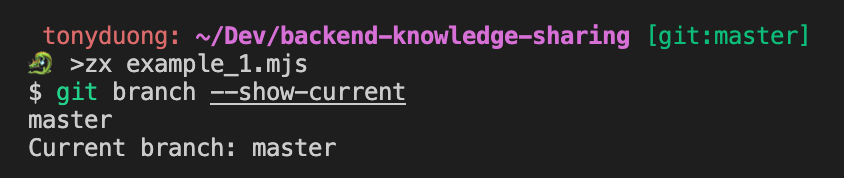
例1 - 現在のブランチ名を表示
- スクリプト 📋
#!/usr/bin/env zx
const branch = await $`git branch --show-current`
console.log(`Current branch: ${branch}`)
- 出力 ✅
例2 - 色と書式を追加
- スクリプト 📋
#!/usr/bin/env zx
$.verbose = false
let branch = await $`git branch --show-current`
console.log(`Current branch: ${chalk.bgYellow.red.bold(branch)}`)
- 出力 ✅

例3 - ユーザー入力を追加
- スクリプト 📋
#!/usr/bin/env zx
$.verbose = false
let filename = await question('What is the filename? ')
let template = await question('What is your preferred template? ', {
  choices: ["function", "class"] // Enables tab completion.
})
let content = ""

if(template == "function") {
    content = `function main() {
    console.log("Test");
}`;
}
else if(template == "class") {
    content = `class Main {
    constructor() {
        console.log("Test");
    }
}`;
}
else {
    console.error(`Invalid template: ${template}`)
    process.exit();
}
fs.outputFileSync(filename, content)
- 出力 ✅ — 🎬 デモ動画を見る
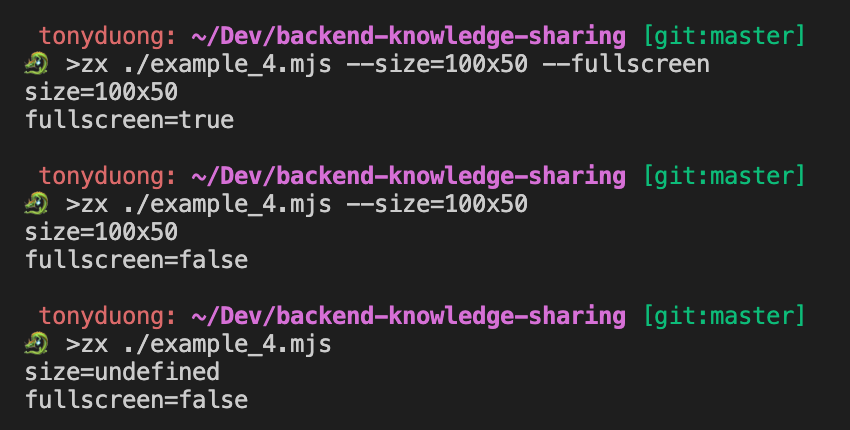
例4 - コマンドライン引数の扱い
- スクリプト 📋
#!/usr/bin/env zx
$.verbose = false
const size = argv.size;
const isFullScreen = argv.fullscreen;
console.log(`size=${size}`);
console.log(`fullscreen=${isFullScreen}`);
zx ./script.mjs --size=100x50 --fullscreen
- 出力 ✅
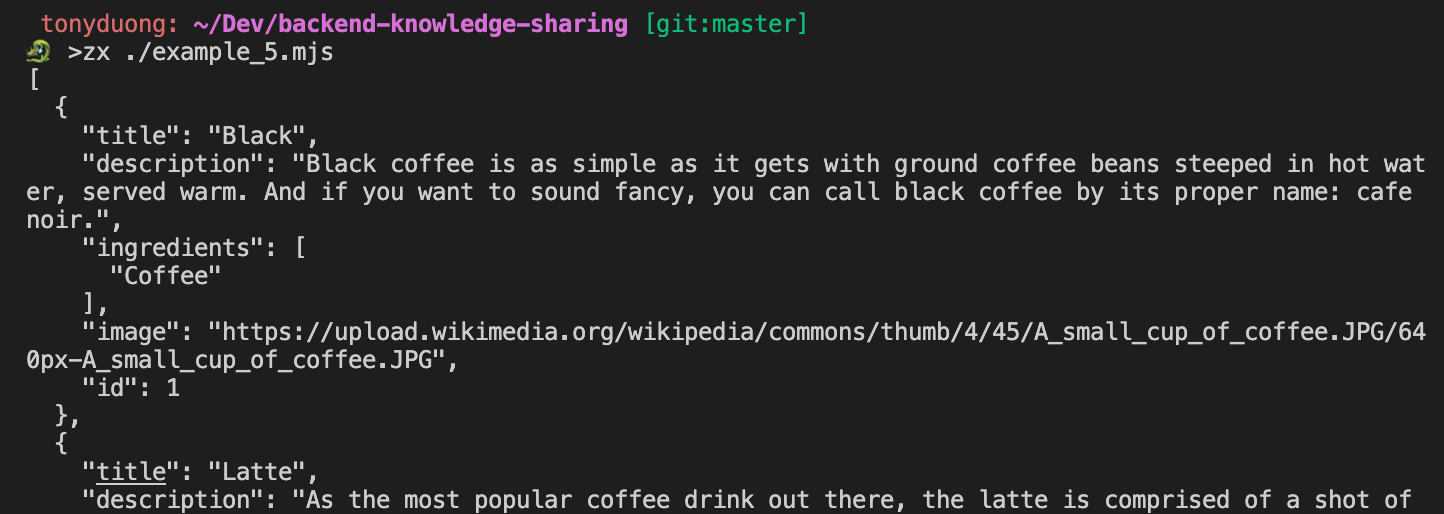
例5 - ネットワークリクエスト
-
Bashでは、BashスクリプトでHTTPリクエストを送るのによく
curlコマンドを使う。zxではnode-fetchmodule を裏で wrap してくれてfetchでできます! -
スクリプト 📋
#!/usr/bin/env zx
$.verbose = false
let response = await fetch('https://api.sampleapis.com/coffee/hot');
if(response.ok) {
  console.log(await response.text());
}
- 出力 ✅
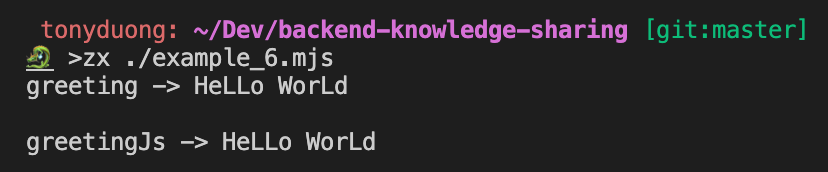
例6 - コマンドパイプラインの構築
- スクリプト 📋
#!/usr/bin/env zx
$.verbose = false
// A pipeline using |
let greeting = await $`echo "Hello World" | tr '[l]' [L]`

console.log(`${greeting}`)
#!/usr/bin/env zx
$.verbose = false;
// The same pipeline but with the .pipe() method
const greeting = await $`echo "Hello World"`.pipe($`tr '[l]' [L]`);

console.log(`greeting -> ${greeting}`);

// Using full JS
const greetingJs = "Hello World".replaceAll("l", "L");

console.log(`greetingJs -> ${greetingJs}`);
- 出力 ✅
例7 - JSON形式の扱い
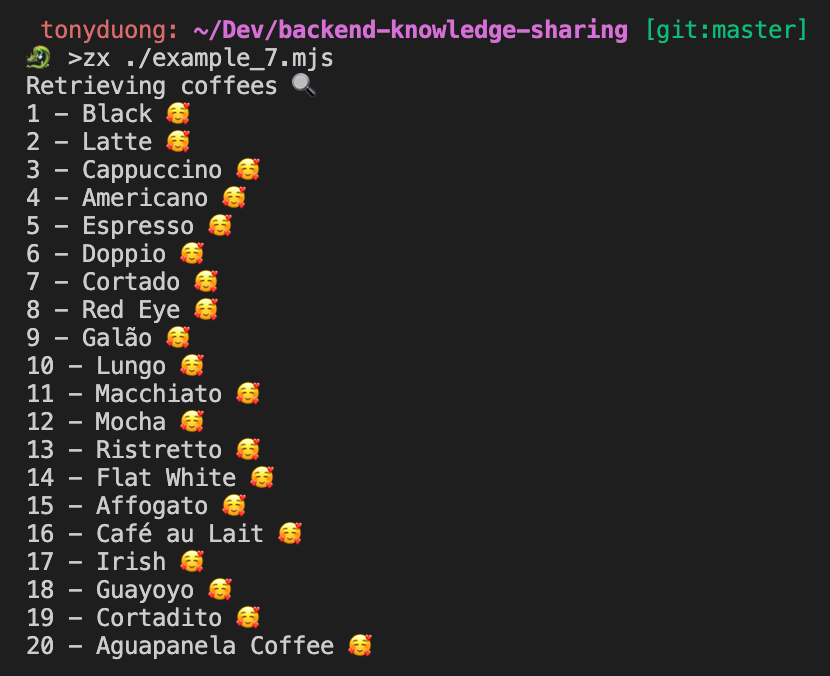
- スクリプト 📋
#!/usr/bin/env zx
$.verbose = false;

console.log("Retrieving coffees 🔍");
const response = await fetch("https://api.sampleapis.com/coffee/hot");
const coffees = JSON.parse(await response.text());

for (let i = 0; i < coffees.length; i++) {
  const coffee = coffees[i];
  console.log(`${coffee.id} - ${coffee.title} 🥰`);
}
- 出力 ✅
例8 - pre-commit
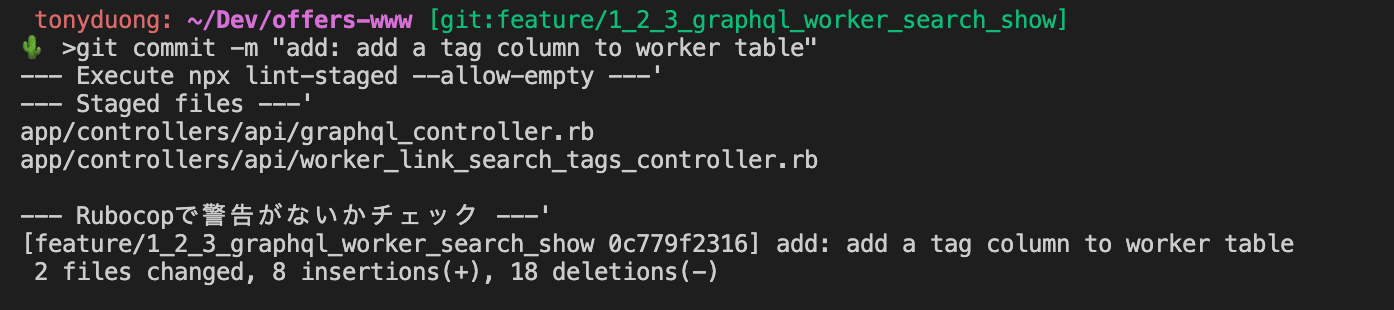
- スクリプト 📋
#!/usr/bin/env -S npx zx
$.verbose = false;

console.log(`--- Execute npx lint-staged --allow-empty ---'`);
await $`npx lint-staged --allow-empty`;

console.log(`--- Staged files ---'`);
let stagedFiles;
try {
  stagedFiles =
    await $`git diff --cached --name-only --diff-filter=AM | grep '\.rb$'`;
} catch {
  console.log("No .rb file staged. Execute commit.");
}

if (stagedFiles) {
  console.log(`--- Rubocopで警告がないかチェック ---'`);
  await $`git diff --cached --name-only --diff-filter=AM | grep '\.rb$' | xargs docker-compose run --rm offers-app rubocop --color --auto-correct --force-exclusion {staged_files}`;
}
- 出力 ✅
まとめ
zxを使うと、JavaScriptの構文でシェルスクリプトが本当に書きやすく、読みやすくなる ⚡️zxをマスターして、複雑なシェルスクリプトとついにおさらばしよう 👋
参考
- https://github.com/google/zx
- https://zenn.dev/offers/articles/20220606-zx-introduction
- https://blog.mastykarz.nl/create-scripts-javascript-zx/
- https://www.sitepoint.com/google-zx-write-node-shell-scripts/
Blockchain 101 ⛓ 90年代メルカリー DApp の作り方 ☎️
ブロックチェーンとは? 🤔
- investopedia.com によると、
ブロックチェーンとは、コンピュータネットワークのノード間で共有される分散型のデータベース、または台帳である。
ブロックチェーンのない世界 💾
- 銀行を例にしてみよう 🏦
- 各銀行は台帳(すべての金銭取引を記録するデータベースのようなもの)を管理していて、それを完全にコントロールしている ⇒ 大きな権力と責任を持っている 💥
- もし誰かが銀行の台帳を改ざんしたら? 😱 もし銀行がルールを曲げ始めて、台帳を操作して何もないところから価値を生み出したら? 😱
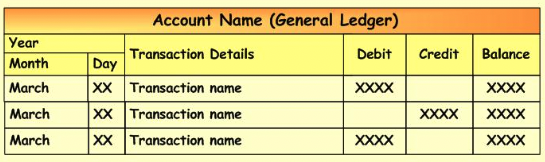
- ブロックチェーンのない世界では、すべての取引の記録を第三者に任せ、信頼する必要がある
2008年、Bitcoinの登場 💡
- Bitcoinは2008年、Satoshi Nakamoto 🇯🇵 が発表したホワイトペーパーとともに登場した。新しい種類の通貨システムと、完全にデジタルな形で価値を生み出し、移転し、保存するための分散型の仕組みを導入するためだ
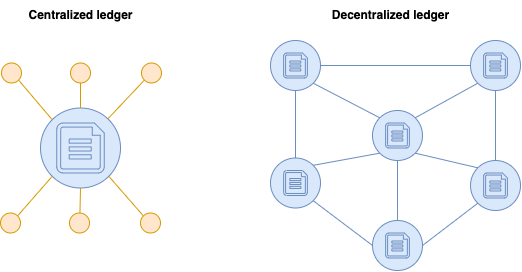
- Bitcoinはブロックチェーンの実装のひとつだが、Ethereumのような他の実装もある。
ブロックチェーンの設計目標 👩🎨
- Peer-to-peer データ配布
Data is distributed across the nodes in the network.
Tasks and workload are distributed and all nodes are equally priviledged.
Each node contains a full copy of the blockchain state.
- 分散化
No master data, thus avoiding a single point of failure. Corruption then becomes much more difficult.
To make data consistent across all the network, an algorithm called "consensus algorithm" is adopted.
- 不変性
You can not change history and can only append operations. Even delete operations are considered as transactions.
- トラストレス
You don't have to trust a third party: bank, person, etc.
Rather, you trust everyone in the blockchain.
ブロックチェーンの実装 🧑💻
- Bitcoinが最初の実装
- Bitcoinの目的は各国の通貨を置き換えること
- 交換手段と価値の保存手段以上のものではない 💵
- でも、同じ原則をもっと汎用的に応用できないだろうか? 🎟 📜 🎶
- 自分があるBitcoinの本当の所有者であることを証明する代わりに、ある美術品、コンサートのチケット、AWS認定資格の本当の所有者であることを証明する似た技術も実装できるはず
- Vitalik Buterinはこのアイデアを思いつき、ブロックチェーンの別バージョンを実装した:Ethereum 🥳
Ethereum とスマートコントラクト
- 通貨は ETH(Ether)
- スマートコントラクトはEthereumネットワークを構成する基本要素
- They are computed programs coded by developers that are run in the Ethereum network
- Once deployed, they cannot be changed. Remember, the blockchain is immutable
- A smart contract has a state (data) and functions
- A smart contract has an address on the Ethereum blockchain like any other Ethereum user account
- 簡単な説明 🐥
- A smart contract is like a vending machine 🤖
- It has some state (🍫 🥤 🍙)  and some functions (view products / buy product / recharge product)
- Once you installed it somewhere, you cannot move it or change its functioning FOREVER
- It has an address (location in the real world) and like any other person wallet, it has some money in it
- ブロックチェーン上の状態を変更するすべてのトランザクションには手数料がかかる 💰(スマートコントラクトのデプロイ、商品の購入、自動販売機の補充など)
では、スマートコントラクトを実装して分散型アプリケーションを作ってみよう - 90年代メルカリ ☎️
技術とツール 🛠
- Ethereum ネットワーク
- Ethereum上でスマートコントラクトを実装するためのプログラミング言語 Solidity
- ブラウザからEthereumネットワークとやり取りするための web3.js ライブラリ 🖥
- Ethereumブロックチェーンとやり取りするためのウォレットである Metamask Chrome 拡張機能 🦊
- Ethereumブロックチェーンをローカルにデプロイするための Ganache(シミュレーター)
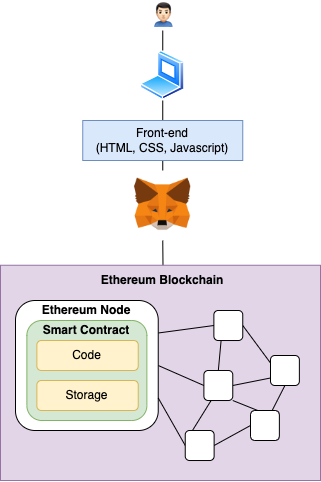
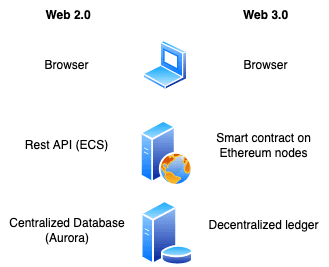
アーキテクチャ 📊
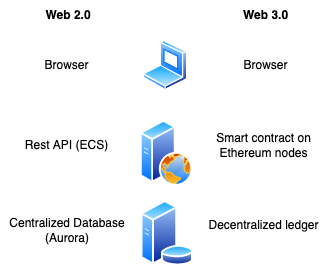
従来のWeb 2.0とWeb 3.0のアーキテクチャの比較
コードを見てみよう 👨🏻💻
https://github.com/tonystrawberry/mercari90-dapp
デモタイム ⏰
- Smart contract の migration
- Metamask で accounts の セットアップ
- 開発環境の立ち上げ
- 商品の出品
- Ganache で transaction の確認
- 商品の購入
- Ganache で transaction の確認
参考 📚
- https://www.udemy.com/course/getting-started-with-ethereum-solidity-development/
- https://arunrajeevan.medium.com/blockchain-design-goals-3be234ccfaf3
- https://docs.soliditylang.org/en/v0.8.15/
皆さんありがとうございました!🙇🏻♂️
- 質問があれば、気楽聞いてください
- このプレゼンテーションは Confluence の TechTalks の下にみれます:https://monstarlab-jp.atlassian.net/wiki/spaces/CD/pages/447087534/Tech+Talk+-+20220728
🌐 Claudeによる翻訳